Compare commits
15
Commits
| Author | SHA1 | Date | |
|---|---|---|---|
 dennis dennis
|
d6d0be65aa | ||
|
dennis
|
6992d95e87 | ||
|
dennis
|
fa2d0dd073 | ||
|
dennis
|
456d259a45 | ||
|
dennis
|
d000e93736 | ||
|
dennis
|
555e614879 | ||
|
dennis
|
1752324b09 | ||
|
dennis
|
d9772f6966 | ||
|
dennis
|
8127d9a54b | ||
|
dennis
|
90f45f4efb | ||
|
dennis
|
2b56dc18d8 | ||
|
dennis
|
298c8e09cd | ||
|
dennis
|
e3134b5a3a | ||
|
dennis
|
7352c4328a | ||
|
dennis
|
ad37a8aef4 |
@@ -5,22 +5,47 @@
|
||||
## Overview
|
||||
|
||||
This extension restricts deletions of relationship between contacts for users not having Delete relationship permission.
|
||||
## Installation
|
||||
|
||||
1. If you have not already done so, setup Extensions Directory
|
||||
1. Go to Administer >> System Settings >> Directories
|
||||
1. Set an appropriate value for CiviCRM Extensions Directory. For example, for Drupal, [civicrm.files]/ext/
|
||||
1. In a different window, ensure the directory exists and is readable by your web server process.
|
||||
1. Click Save.
|
||||
1. If you have not already done so, setup Extensions Resources URL
|
||||
1. Go to Administer >> System Settings >> Resource URLs
|
||||
1. Beside Extension Resource URL, enter an appropriate values such as [civicrm.files]/ext/
|
||||
1. Click Save.
|
||||
1. Install Delete Relationship Permission extension
|
||||
1. Go to Administer >> Customize Data and Screens >> Manage Extensions.
|
||||
1. Click on Add New tab.
|
||||
1. If Delete Relationship Permission is not in the list of extensions, manually download it and unzip it into the extensions direction setup above, then return to this page.
|
||||
1. Beside Delete Relationship Permission, click Download.
|
||||
1. Review the information, then click Download and Install.
|
||||
|
||||
This extension has been developed and is being maintained by [Megaphone Technology Consulting](https://www.megaphonetech.com/).
|
||||
|
||||
## Requirements
|
||||
|
||||
- PHP v7.0+
|
||||
- CiviCRM 4.6+
|
||||
|
||||
|
||||
## Installation (Web UI)
|
||||
|
||||
1. If you have not already done so, setup *Extensions Directory*
|
||||
1. Go to **Administer » System Settings » Directories**
|
||||
1. Set an appropriate value for *CiviCRM Extensions Directory*. For example, for Drupal, `[civicrm.files]/ext/`
|
||||
1. In a different window, ensure the directory exists and is readable by your web server process.
|
||||
1. Click **Save**.
|
||||
1. If you have not already done so, setup *Extensions Resources URL*
|
||||
1. Go to **Administer » System Settings » Resource URLs**
|
||||
1. Beside Extension Resource URL, enter an appropriate values such as `[civicrm.files]/ext/`
|
||||
1. Click **Save**.
|
||||
1. Install Delete Relationship Permission extension
|
||||
1. Go to **Administer » System Settings » Extensions**.
|
||||
1. Click on **Add New tab**.
|
||||
1. If Delete Relationship Permission is not in the list of extensions, manually download it and unzip it into the extensions direction setup above, then return to this page.
|
||||
1. Beside *Delete Relationship Permission*, click **Download**.
|
||||
1. Review the information, then click **Install**.
|
||||
|
||||
## Installation (CLI, Zip)
|
||||
|
||||
Sysadmins and developers may download the .zip file for this extension and install it with the command-line tool [cv](https://github.com/civicrm/cv).
|
||||
|
||||
`cd <extension-dir>`
|
||||
|
||||
`cv dl com.megaphonetech.deleterelationshipperm@https://git.megaphonetech.com/CiviWare/com.megaphonetech.deleterelationshipperm/archive/master.zip`
|
||||
|
||||
## Installation (CLI, Git)
|
||||
|
||||
This extension has not yet been published for installation via the web UI.
|
||||
|
||||
## Usage
|
||||
|
||||
Upon installation, your access control table will gain a new row where you can specify which user types are allowed to delete contact relationships. Find them by going to **Administer menu » Users and Permissions » Permissions (Access Control) » Wordpress Access Control** [note: Drupal users will have a slightly different path].
|
||||
|
||||
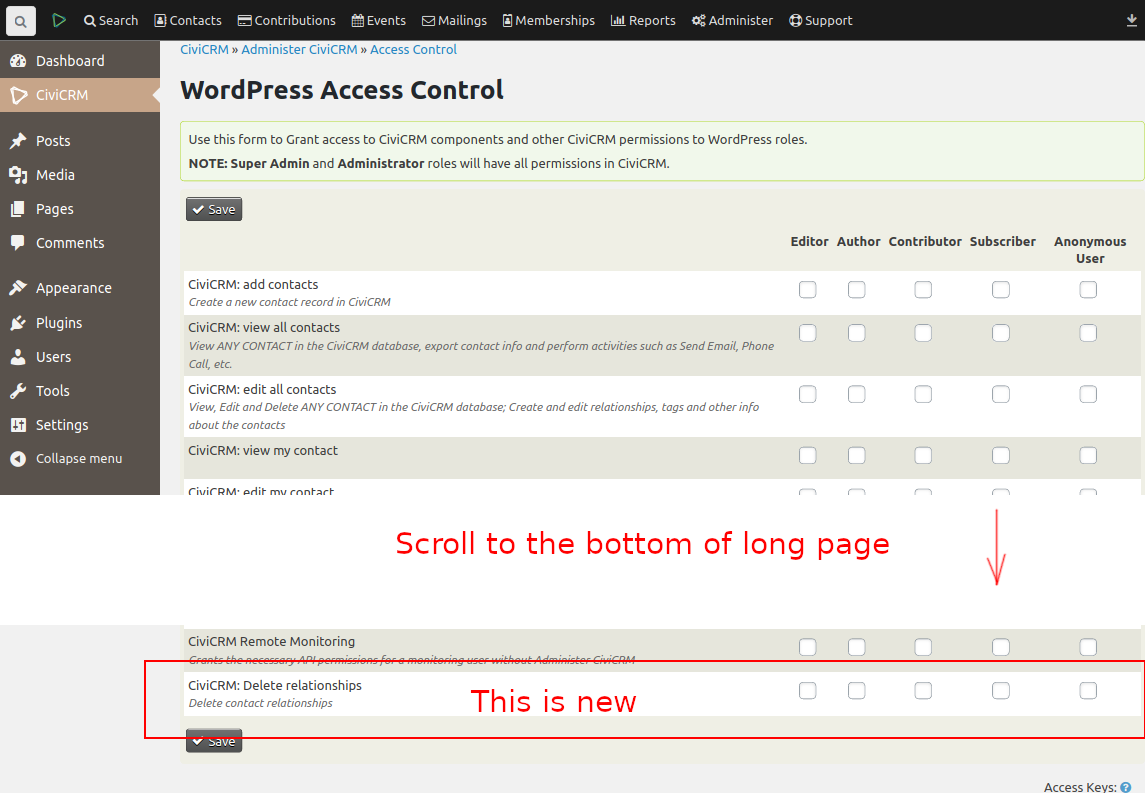
|
||||

Binary file not shown.
|
After Width: | Height: | Size: 138 KiB |
@@ -9,9 +9,9 @@
|
||||
<email>jon@megaphonetech.com</email>
|
||||
</maintainer>
|
||||
<urls>
|
||||
<url desc="Main Extension Page">http://FIXME</url>
|
||||
<url desc="Documentation">http://FIXME</url>
|
||||
<url desc="Support">http://FIXME</url>
|
||||
<url desc="Main Extension Page">https://git.megaphonetech.com/CiviWare/com.megaphonetech.deleterelationshipperm</url>
|
||||
<url desc="Documentation">https://git.megaphonetech.com/CiviWare/com.megaphonetech.deleterelationshipperm</url>
|
||||
<url desc="Support">https://git.megaphonetech.com/CiviWare/com.megaphonetech.deleterelationshipperm/issues</url>
|
||||
<url desc="Licensing">http://www.gnu.org/licenses/agpl-3.0.html</url>
|
||||
</urls>
|
||||
<releaseDate>2018-06-28</releaseDate>
|
||||
|
||||
Reference in New Issue
Block a user